Viewing Reports
Pulse has several built-in reports that you can use to review deposit, sales transaction, and chargeback activity in addition to monthly statements and general reports.
Steps
-
Start Pulse by clicking its button on the toolbar.

-
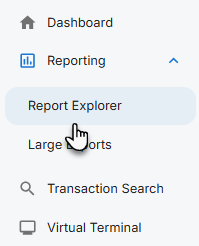
On the left side menu, click Report Explorer.
-
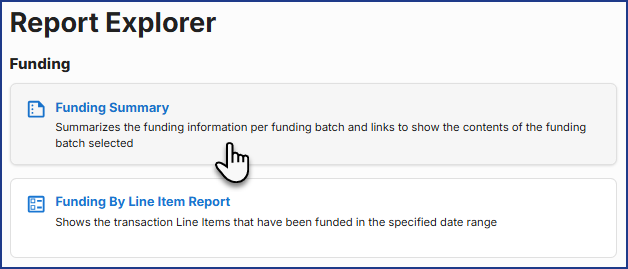
Click a report button to run the report.
Tips
-
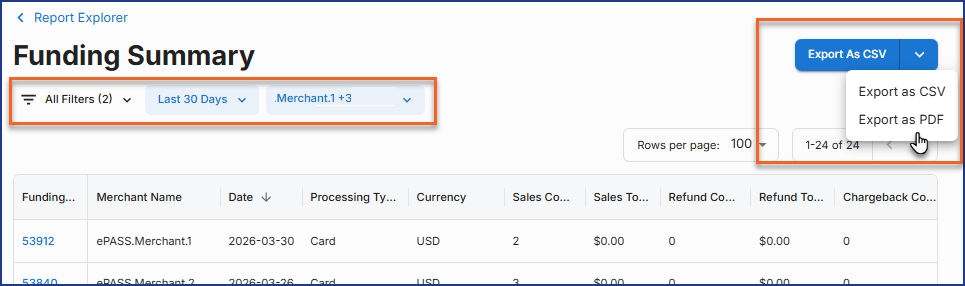
Adjust the report parameters using the available filter options.
-
For most reports, you can choose to download a copy as an CSV file or a PDF.
-
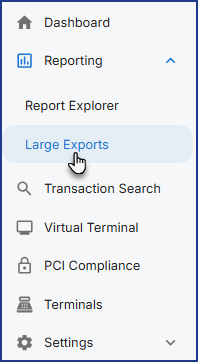
Oversize CSV exports will appear on the Large Exports page for download.
Report Types and Details
Funding
| Report Name | Details |
|---|---|
| Funding Summary | Shows the funding information in summary per funding batch and provides links to the Funding Detail Report that shows the contents of the funding batch selected. Click the Funding ID hyperlink to view the funding details. |
| Funding by Transaction Report | Shows the transactions that have been funded in the specified date range. Similar to the Funding Details Report but shows all the transactions that have been funded in the specified date range. |
| Funding by Line Item Report | Shows the transaction line items that have been funded in the specified date range. |
Transactions
| Report Name | Details |
|---|---|
| Transaction Summary | Shows total transaction count and volume per day for each payment method. Only shows the total transactions in count and volume per day for each payment method. |
| Transaction Report | Shows all transactions (successful and failed) that occurred during the specified date range. |
Chargebacks
| Report Name | Details |
|---|---|
| Chargeback Summary | Shows the count and volume of chargebacks for the given date range. |
| Chargeback Report | Shows the details of chargebacks for the specified date range. |
| Chargeback Action Report | Shows the details of chargeback actions for the specified date range. |
Merchant
| Report Name | Details |
|---|---|
| Merchant Statement | Quickly export a monthly PDF with summaries of fees, daily transactions, payment methods, chargebacks, etc. during the month selected. |
| Merchant Deposit Report | Provides deposit summaries and listings of the fees, chargebacks, and ACH returns in the deposits during the month selected. |
EFT Returns
| Report Name | Details |
|---|---|
| EFT Returns Summary | Shows the count and volume of EFT Returns for the given date range. |
| EFT Returns Report | Shows the details of EFT Returns for the specified date range. |
Gift Card Operations
| Report Name | Details |
|---|---|
| Gift Card Operation Summary | Shows total gift card operation count and volume per day for each payment method. |
| Gift Card Operations Report | Shows all gift card operation (successful and failed) that occurred during the specified date range. |
See Also
Updated
April 2, 2026